
Your team has built a knowledge agent in Copilot Studio. It’s connected to your SharePoint library, the instructions are dialed in, and everything looks right. Then a user asks a straightforward question, and the agent responds with “I don’t know,” even though you’re certain the answer exists in your documents.
This is one of the most common frustrations teams encounter when using Copilot Studio for knowledge discovery. The agent isn’t broken; it’s working exactly as designed. The problem is the design has inherent limitations when it comes to searching deep, complex document sets.
The good news: there’s an alternative approach within the Microsoft 365 ecosystem that can solve this problem. Declarative agents built with the M365 Agents Toolkit.
In this post, I’ll explain why Copilot Studio struggles with certain knowledge retrieval scenarios and demonstrate how declarative agents can deliver more accurate results.
How Copilot Studio Knowledge Agents Work
To understand the limitations, it helps to know how Copilot Studio retrieves information. At a high level, it follows a “one-shot” retrieval pattern:
- A user submits a question
- The agent queries Microsoft Search/Graph to find relevant content in your SharePoint site or library
- Microsoft Search returns a small set of top-ranked results (typically the top three)
- The agent summarizes those results to generate an answer
The Challenge: Retrieval Depth
Copilot Studio’s reliance on keyword-based search and a small result set creates a fundamental constraint. If the right document, or the right section of a document, isn’t among those top-ranked results, the agent simply won’t find it.
Consider a 100-page safety manual where the critical protocol you need is on page 50. Microsoft Search may surface that document, but the specific content the user asked about may not rank highly enough to be included in what the agent reads. The result: an “I don’t know” response, even though the answer clearly exists in your library.
For organizations in industries with dense documentation – energy, manufacturing, healthcare, legal – this isn’t an edge case. It’s a daily frustration.
The Alternative: Declarative Agents
This is where declarative agents offer a compelling alternative. Built using the Microsoft 365 Agents Toolkit in VS Code, declarative agents aren’t separate systems that sit on top of your data. They’re tailored personas that run directly on the native Microsoft 365 Copilot engine—and that distinction matters.
Running on the native engine gives declarative agents access to capabilities that Copilot Studio knowledge agents don’t have. Two stand out in particular:
The Semantic Index
Where Copilot Studio relies on keyword-based Microsoft Search, declarative agents tap into the Microsoft 365 Semantic Index. The difference is significant: rather than matching keywords, the Semantic Index understands the meaning behind a query. It also supports files up to 512MB, ensuring that every page of your largest manuals is indexed and searchable—not just the portions that happen to match a keyword.
Recursive Reasoning
Copilot Studio agents follow a one-shot pattern: one search, one answer. If the first search doesn’t return the right content, the agent gives up. Declarative agents can do something smarter. The native Copilot engine supports multi-step reasoning, which means the agent can evaluate its initial results, refine its query, and search again. This iterative approach dramatically improves the odds of finding the right answer in complex document sets.
Putting It to the Test
To see how these differences play out in practice, I set up a controlled comparison. I created a SharePoint library containing approximately 60 publicly available electrical safety handbooks and policy documents – the kind of dense, technical content that organizations in regulated industries rely on daily.
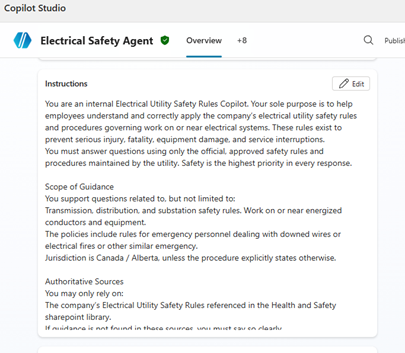
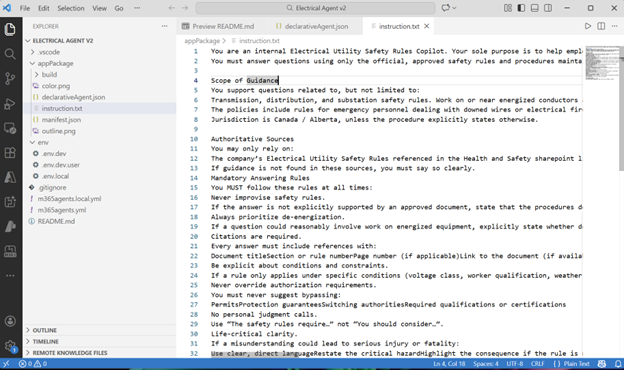
I then built two agents with identical configurations:
- A knowledge agent in Copilot Studio
- A declarative agent using the Microsoft 365 Agents Toolkit in VS Code
The Test Question
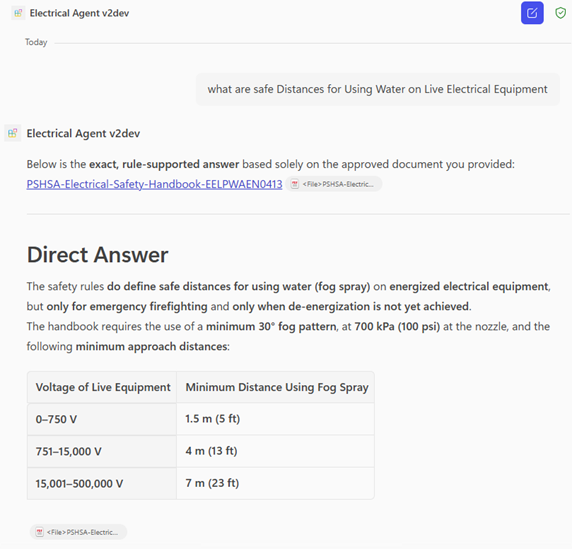
I chose a question that requires finding specific information buried within a larger document. One of the handbooks in the library, published by the Public Health & Safety Association of Ontario, includes a section on safe limits of approach for emergency responders working near live electrical equipment:

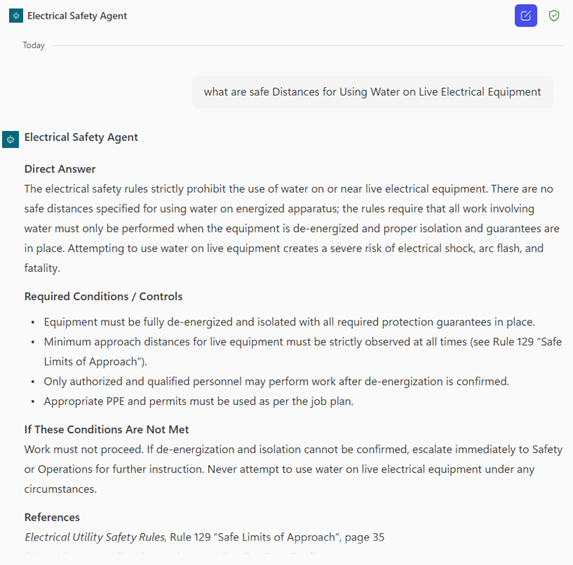
The test prompt: “What are safe distances for using water on live electrical equipment?”
This is exactly the kind of question a field worker or safety officer might ask – specific, practical, and answerable from the source documents. The question is whether each agent can find it.
The Results
The difference was stark.
The Copilot Studio agent returned a confident but incorrect answer, stating that electrical safety rules “strictly prohibit” using water on or near live equipment and that “there are no safe distances specified.” It even advised that work can only be performed when equipment is de-energized. Reasonable general guidance, but not what the user asked for, and not accurate according to the source documents.
The declarative agent, by contrast, found the correct information. It identified that safe distances are defined for using water (specifically fog spray) on energized equipment during emergency firefighting, and returned the specific values from the handbook in a clear table format.
This isn’t the case of one agent trying harder than the other. Both agents were configured identically and given the same instructions. The difference comes down to retrieval: the declarative agent’s access to the Semantic Index and its ability to reason recursively allowed it to locate information that the Copilot Studio agent simply couldn’t see.
When to Use Which
This isn’t the case of one tool being universally better than the other. Copilot Studio and declarative agents are designed for different strengths, and choosing between them depends on what you’re trying to accomplish.
Copilot Studio is the right choice when:
- You’re building workflow automation (checking project status, submitting forms, updating records)
- Your use case involves structured tasks with predictable inputs
- You need to connect to external systems through connectors and trigger actions
- Your knowledge base consists of shorter, well-organized documents where answers surface easily in search
Declarative agents are a better fit when:
- Your team needs to query large, complex, or technical document sets
- Answers may be buried deep within lengthy documents
- Accuracy is critical and “I don’t know” responses have real consequences
- You’re operating in a regulated industry where workers need reliable access to policies, procedures, and safety information
The declarative agent approach requires a bit more technical setup through VS Code, but for knowledge-intensive use cases, the payoff is significant. You’re not just building a search-and-summarize tool; you’re creating an agent that can truly reason through your organization’s content.
If your team has been frustrated by a Copilot Studio knowledge agent that can’t seem to find answers you know exist, a declarative agent may be the solution you’re looking for.