
It’s 11 p.m. the night before a major release. A developer has just spotted a regression, a bug quietly introduced two sprints ago that somehow made it through testing. The release slips. The post-mortem is uncomfortable. And somewhere in the back of everyone’s mind is the same uneasy question: how did we miss that?
For many software teams, this scenario is not exceptional. It’s routine.
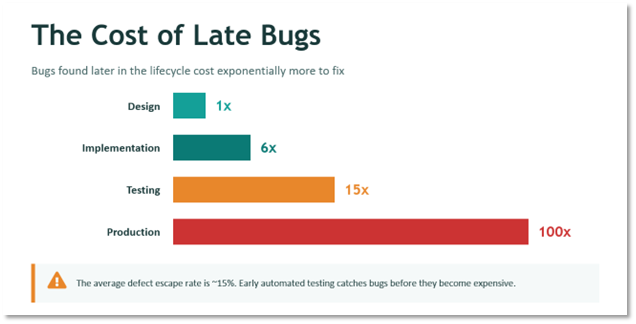
As applications grow more complex and release cycles accelerate, QA teams face a familiar squeeze: more to test, the same number of hours to test it, and an ever-shrinking window before the next release. Manual testing can’t keep pace. Regression suites balloon with every new feature. And the later the defect surfaces, the more expensive it becomes. Bugs caught in production cost roughly 100 times more to fix than those caught during design (1).
The result is a tradeoff most teams know well: move fast and accept higher risk, or slow down to protect quality.
At Lantern, we’ve been working on a different answer — one where AI helps QA teams scale their coverage and speed without losing the human judgment that good testing requires.
The Real Problem with Traditional QA
Most teams understand the theory: catch bugs early, test often, automate wherever possible. The industry data supports it. Defects found at the design stage cost roughly 1x to fix; the same bug found in production costs 100x. The average defect escape rate, bugs that slip through QA into production, hovers around 15%.
Test automation is usually positioned as the solution. In practice, it introduces a new set of challenges that many teams don’t anticipate:
- Automated tests still require skilled developers to write and maintain scripts
- Building a solid test suite can consume as much time as building the feature itself
- Authentication flows and multi-factor login are notoriously difficult to automate cleanly
- As the application evolves, test suites become their own maintenance burden
The result: automation adoption stalls or delivers far less value than expected. Teams end up with partial coverage, brittle scripts, and a nagging sense that their test suite is more liability than asset.
Reframing the Question
Rather than asking “How do we automate more tests?”, the more productive question is: “What if AI could eliminate the hardest, most time-consuming parts of QA while keeping humans firmly in control of what matters?”
The goal isn’t to replace QA engineers or developers. It’s to redirect their effort toward the work that genuinely requires human judgment:
- Deciding what should be tested and why
- Validating that outcomes match intent
- Diagnosing and acting on failures
Everything else, writing test scripts, generating documentation, running regression suites repeatedly, is exactly the kind of repetitive, rule-bound work where AI can carry the load.
How Lantern’s AI-Enabled QA Approach Works
The process starts from something teams already produce: well-written acceptance criteria. Using the familiar Given / When / Then format common in agile development, teams describe the behavior they want to verify. From there, the system takes over.
- Write the scenario in plain language
Teams describe expected behavior using acceptance criteria. No test scripting knowledge required, just a clear description of what the application should do.
- Let the AI agent execute it
The VS Code agent, powered by GitHub Copilot, connects to a locally running Playwright MCP server that navigates the live application like a real user — clicking through pages, entering data, and validating behavior in real time. It doesn’t simulate the UI; it interacts with it directly. The agent operates within VS Code’s agent mode permission model, which prompts for approval before invoking tools. The Playwright MCP server runs as a local process, but it requires no elevated system access and operates only within the boundaries the user has configured. For teams that have wondered whether AI-driven testing requires handing over significant system control, the answer is no.
- Generate test artifacts automatically
Once the scenario runs successfully, the system produces two outputs simultaneously: a reusable automated test for regression testing, and a clear, human-readable manual test case suitable for User Acceptance Testing (UAT) or visual validation. Both come from a single prompt.
- Reuse and rerun as the application evolves
The automated tests can be executed repeatedly as the application changes, without rewriting scripts. Coverage grows with the product, not against it.
This approach is built on tools most teams already have: Visual Studio Code, GitHub Copilot for AI agent execution, and Playwright for test automation – connected via the Playwright MCP (Model Context Protocol) server, which provides the agent with a structured, controlled interface for browser interaction. No proprietary platforms. No heavy new tooling. No months-long implementation project before you see results.
What This Looks Like in Practice
To see how this works in practice, consider a simple but representative user journey: navigate to a website, find a specific product, select the correct option, and validate the expected behavior. Straightforward on the surface, but exactly the kind of scenario that teams test repeatedly across releases, and exactly the kind that tends to break quietly when something upstream changes.
In a live demonstration of this approach, that journey was defined once using plain acceptance criteria. The AI agent then took over: opening a browser, navigating the site, working through each step exactly as a real user would, and validating the outcome in real time. No scripting. No test framework configuration. No back-and-forth between QA and development to get the environment set up.
When the scenario completed successfully, the system produced two artifacts. A full automated test ready to be rerun on demand, and a structured manual test document with clearly outlined steps and expected results. Both outputs from a single set of acceptance criteria.
The kind of work that would typically consume several hours of scripting and documentation was done. The team’s only job at that point was to decide what to test next.
What Makes This Different from Conventional Automation
The most important distinction isn’t technology, it’s where responsibility sits.
Traditional automation attempts to eliminate human involvement from testing altogether. That sounds efficient, but it pushes engineers toward fragile, high-maintenance scripts and doesn’t remove the cognitive work – it just relocates it.
This approach does something different: AI handles execution and repetition. Humans handle judgment and accountability.
In practice, that means:
- No deep scripting expertise required — QA teams and product owners describe behavior, not code
- Human-in-the-loop control is preserved — the AI runs tests and surfaces results, but developers decide how to interpret and respond to failures
- Automation and documentation are produced together — each test generates both a machine-runnable script and a manual test case, improving QA and UAT in a single step
- Real-world complexity is handled — authentication and multi-factor login flows are addressed by allowing an initial human login, then reusing the authenticated session across tests
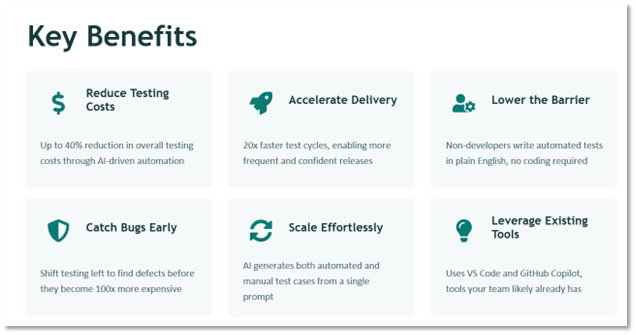
What used to take hours of scripting and documentation now happens automatically, starting only from well-written acceptance criteria. The test cycle becomes 20x faster. Overall testing costs can drop by up to 40% (2). And crucially, non-developers can write automated tests in plain English, no coding required.
Where This Approach Delivers the Most Value
AI-enabled QA is especially effective for teams that recognize themselves in any of these situations:
- Web applications built with pro-code or low-code tools (Power Platform, React, Angular, and similar UI-driven environments)
- Teams running frequent releases with heavy regression testing requirements
- Organizations where QA capacity has become the bottleneck on delivery speed
- Projects where documentation quality for UAT consistently falls short
Because the approach focuses on what users do, not how the application was built, it works equally well for professional engineering teams and low-code environments. The abstraction layer is the acceptance criteria, and that’s something every team already writes.
Quality That Scales with Innovation
Here’s what we’ve learned from applying this in practice: QA doesn’t have to slow software delivery. And automation doesn’t have to mean more complexity.
The teams that benefit most aren’t those that hand testing entirely over to AI. They’re the ones that use AI to do the work that shouldn’t require a human, so their humans can focus on the work that should.
That’s not a subtle distinction. It’s the difference between a QA function that’s always catching up and one that’s scaling.
Lantern applies AI-enabled QA in two ways:
- Embedded within delivery teams as part of application builds where QA is in scope, and
- As enablement for internal client QA teams that are struggling to keep pace with development velocity.
In both cases, the focus is the same. Practical adoption, realistic workflows, and clear ownership between AI and human roles.
The goal isn’t a hands-off testing pipeline. It’s a team that tests more, faster, and with more confidence, because they’re no longer spending their best hours on work a machine can do better.
Sources: