
In the last post, we made a simple point: Microsoft Fabric’s price is fixed, but what runs on it is not. That raises the obvious next question. If the SKU doesn’t control your consumption, what does?
The honest answer is that most organizations treat Fabric cost as a single decision: which SKU to buy. In practice, it’s three decisions. And most teams only make the first one on purpose. The other two get made by default, one new workspace and one new workload at a time, until something slows down and nobody can explain why.
Here’s the framework we use with customers. Every Fabric cost conversation we’ve had eventually touches all three, whether anyone planned it that way or not.
Decision 1: How much capacity do we actually need?
Capacity sizing is the decision of how much Fabric compute your organization needs to support its real workload pattern. That includes the peaks, not just the average.
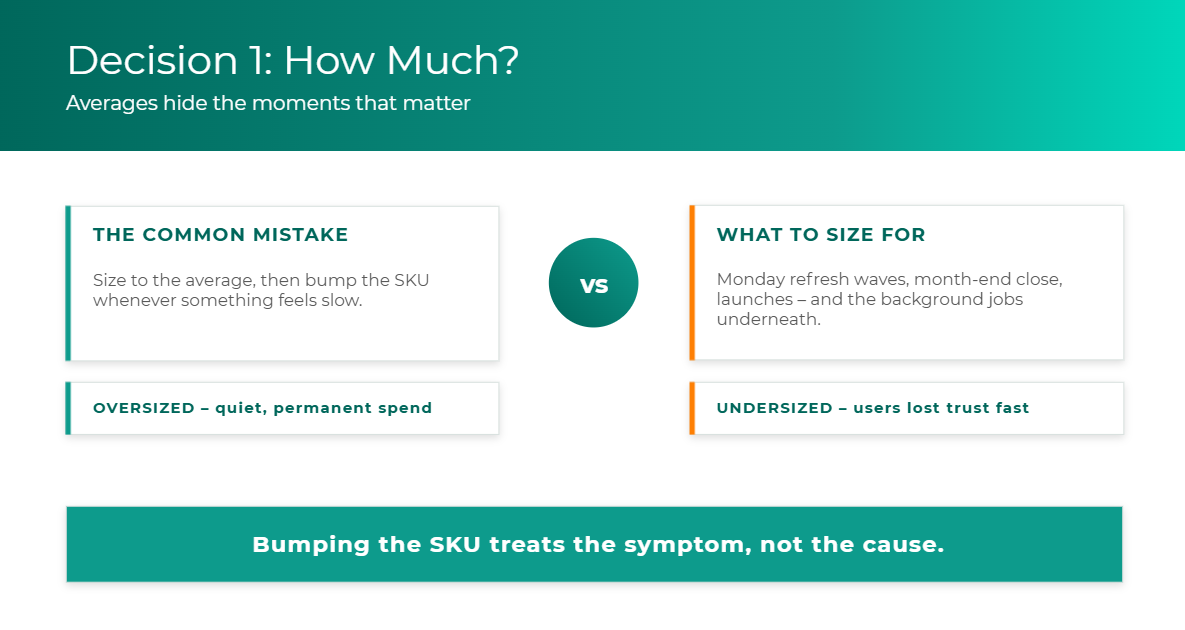
Sizing is where most organizations go wrong first, and it’s an easy mistake to make. Someone opens a dashboard, sees modest average utilization, and concludes the capacity is fine. But averages hide the moments that actually matter:
- The Monday morning refresh wave
- Month-end close
- A product launch or seasonal reporting cycle
- A heavy background job that happens to run while everyone is trying to open a report
Those are the moments your users remember. A capacity sized to the average will feel fine most of the week and fail exactly when the business is paying attention.
It also matters what kind of work is driving the load. Interactive work, like someone opening a report or clicking a visual, and background work, like refreshes, pipelines, and scheduled jobs, behave very differently on a Fabric capacity. That difference is significant enough that we’re giving it its own post next week.
Two ways to get it wrong
The most common failure mode is defaulting to “just bump the SKU” every time something feels slow. It works for a while. It also quietly inflates your bill without ever answering why the workload behaved that way. Bumping the SKU treats the symptom, not the cause.
The opposite mistake is just as damaging. It’s slower to show up, but it’s arguably worse. An undersized capacity degrades the experience gradually: refreshes start slipping, reports get sluggish, and eventually the business stops trusting the platform. Oversizing costs you money quietly and permanently. Undersizing costs you adoption, and adoption is much harder to win back.
A diagnostic you can run this week
Before you resize anything, look at the shape of your utilization over time, not a single snapshot:
- Consistently high around the clock? That points to a genuine sizing problem.
- Fine most of the day, but spiking hard in specific windows? That points to a workload-management problem, such as scheduling collisions or a background job stepping on interactive hours.
If it’s the second pattern, resizing is almost always the wrong first move. You’d be paying more to solve a problem that rescheduling or separating a single workload might solve for free.
Decision 2: What should share capacity, and what should be separated?
Capacity organization is the decision of which workloads draw from the same pool of compute and which get their own. This is the decision most organizations never consciously make. And if you don’t decide what shares capacity, Fabric effectively decides for you: everything shares.
That’s how you end up with your most important executive dashboards competing for cycles with an experimental pilot, and nobody chose that on purpose.
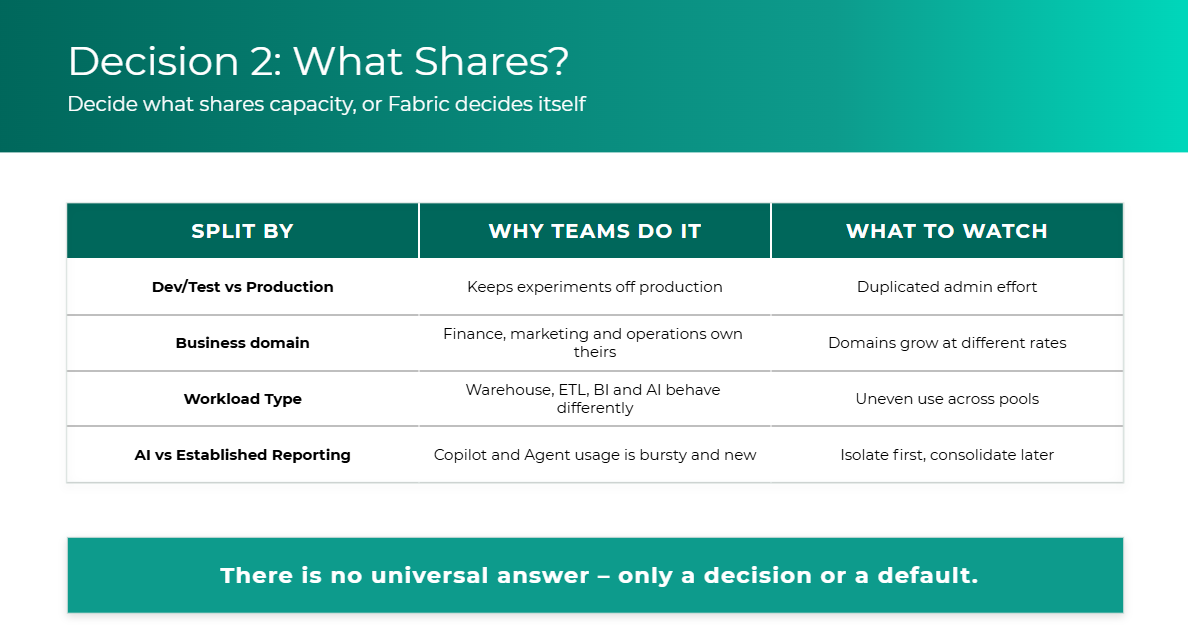
There are four common ways organizations divide their capacity. Each solves a real problem, and each comes with something to watch:
The AI question deserves its own answer
The question we hear most often right now is whether Copilot or a Data Agent should sit on the same capacity as established reporting.
AI consumption doesn’t look like traditional BI consumption. It’s bursty, it depends on how actively people are using the agent, and early in a rollout you have no usage history to size against. There’s no universal right answer, but our default recommendation is straightforward: if leadership depends on your existing dashboards daily, isolate the new AI workload first. Once you have real usage data, you can make an informed decision about consolidating.
The alternative is letting your first Copilot rollout become the thing that throttles the CFO’s dashboard. That’s a tough way to launch an AI program.
Don’t overcorrect
A word of caution in the other direction. The answer to “everything shares” is not twenty tiny capacities. Over-fragmenting creates its own administrative burden, strands unused compute in pools that don’t need it, and makes the whole environment harder to govern. The goal is a small number of intentional boundaries, drawn around the workloads that genuinely need protecting.
There’s no universal answer to this decision. There’s only a decision or a default.
Decision 3: Who owns consumption?
Consumption ownership is the decision of who is accountable for the capacity each workspace and workload uses, and for the value it produces in return.
This is the decision that tends to matter most to executives, and for good reason. Once multiple teams draw from the same capacity, platform cost can’t stay an IT-only line item. If nobody outside IT can see or explain what they consume, nobody outside IT has any reason to change how they consume it.
Ownership should exist at the workspace and workload level, ideally with both a business owner and a technical owner attached. Someone’s name should sit next to “this is why we consume what we consume.”
A maturity ladder, not a switch
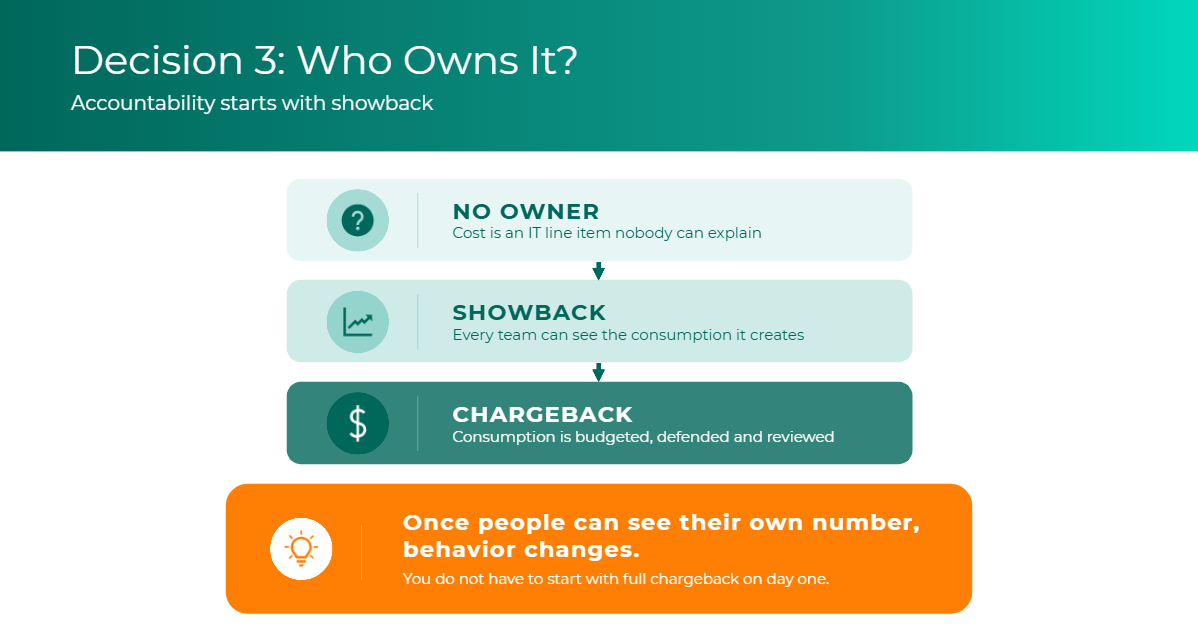
Accountability usually develops in three stages:
- No owner. Capacity cost is an IT line item nobody can explain.
- Showback. Every team can see the consumption it creates, but isn’t billed for it.
- Chargeback. Consumption is budgeted, defended, and reviewed by the teams that drive it.
You don’t have to start with full chargeback on day one. Most organizations shouldn’t. Chargeback requires clean attribution, agreed allocation rules, and finance processes that take time to build. Showback is a perfectly good starting point, and it delivers most of the behavioral benefit on its own. Once people can see their own number, behavior changes.
Ownership is also how you answer the question every new workload eventually faces: is this worth what it consumes? That’s especially true for AI. Showback early in a Copilot or Data Agent rollout gives you the visibility to judge whether it’s generating enough value before you decide to scale it.