
It’s Tuesday morning. A large refresh ran overnight on Monday and finished hours ago. The capacity utilization chart looks reasonable. And yet reports are crawling, users are complaining, and someone on the data team is asking the question we hear more than almost any other:
“Our numbers look fine right now. So why is everything still slow?”
In the last post, we said that sizing a Fabric capacity depends on what kind of work is driving the load, and that interactive and background work behave differently enough to deserve their own post. This is that post. Once you understand how Fabric smooths and throttles, the Tuesday-morning mystery stops being a mystery.
Where the sizing diagnostic get tricky
In Part 2, we offered a simple diagnostic. Look at the shape of your utilization over time. If it’s high around the clock, you likely have a sizing problem. If it’s fine most of the day but spikes hard in specific windows, you likely have a workload-management problem.
That diagnostic still holds. But there’s a complication. Fabric doesn’t always feel a spike at the moment the spike happens. The effects of heavy usage can be spread out and pushed forward in time, sometimes by many hours. So the pain your users feel on Tuesday morning may have been caused by something that ran Monday night.
To read your capacity correctly, you need to understand the mechanics underneath it.
Fabric bursts and smooths. It doesn’t fall over.
The first thing to unlearn is the idea that Fabric stops working the moment you exceed your capacity. It doesn’t.
When a workload needs more compute than your capacity provides, Fabric lets it burst, running above your limit to finish the job quickly. It then smooths that excess, spreading the consumption over a window of time so it’s paid back gradually rather than all at once.
This is a sensible design. It means a single heavy operation doesn’t instantly break everything else, and it lets you run on a smaller capacity than your absolute peak would otherwise require.
But smoothing is forgiving right up until it isn’t. The excess you burst through today doesn’t disappear. It’s borrowed against future capacity, and it has to be paid back.
Two kings of work, two very different windows
How long Fabric spreads that excess out depends on the type of work:
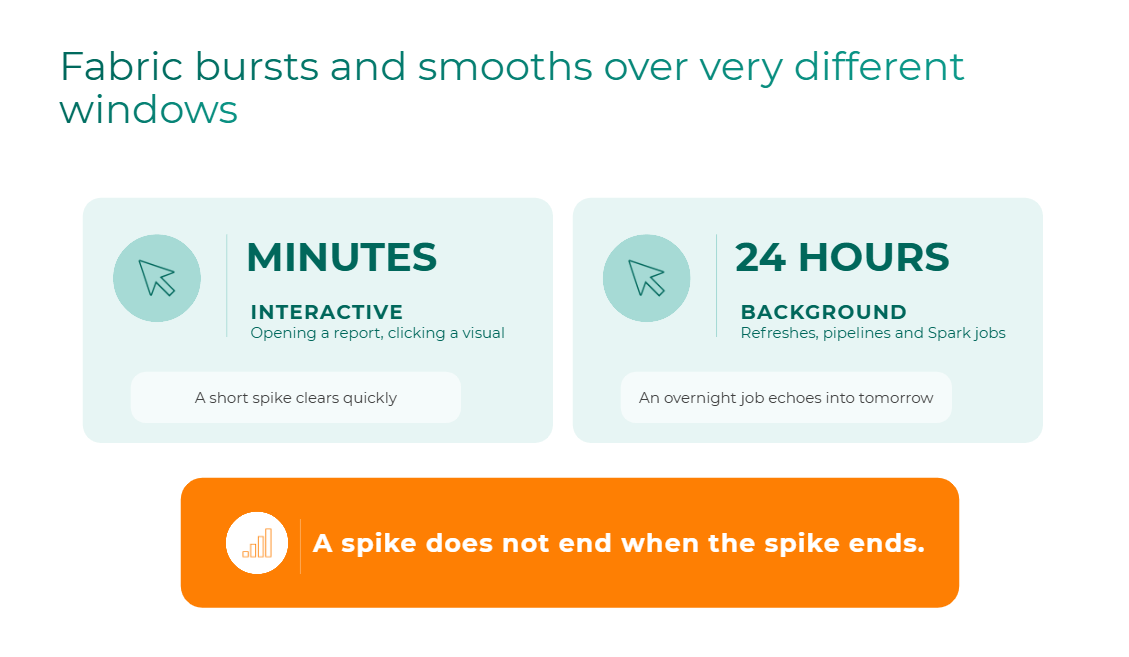
That difference is the whole story behind the Tuesday-morning mystery. A heavy background job doesn’t just consume capacity while it runs. Its excess is smoothed across the following 24 hours, quietly using up capacity that your interactive users are counting on the next morning.
One detail catches teams off guard: Fabric Data Warehouse operations are classified as background, so they also get the 24-hour window. If you think of your warehouse queries as “interactive” because a person is waiting on them, your mental model of your capacity may be off.
A spike doesn’t end when the spike ends. Background overage leaves a backlog, and that backlog has to burn down before your capacity is fully yours again.
Throttling is a ladder, not an on/off switch
If you keep borrowing against future capacity, Fabric eventually starts pushing back. It does this in stages, based on how much future capacity you’ve already consumed:
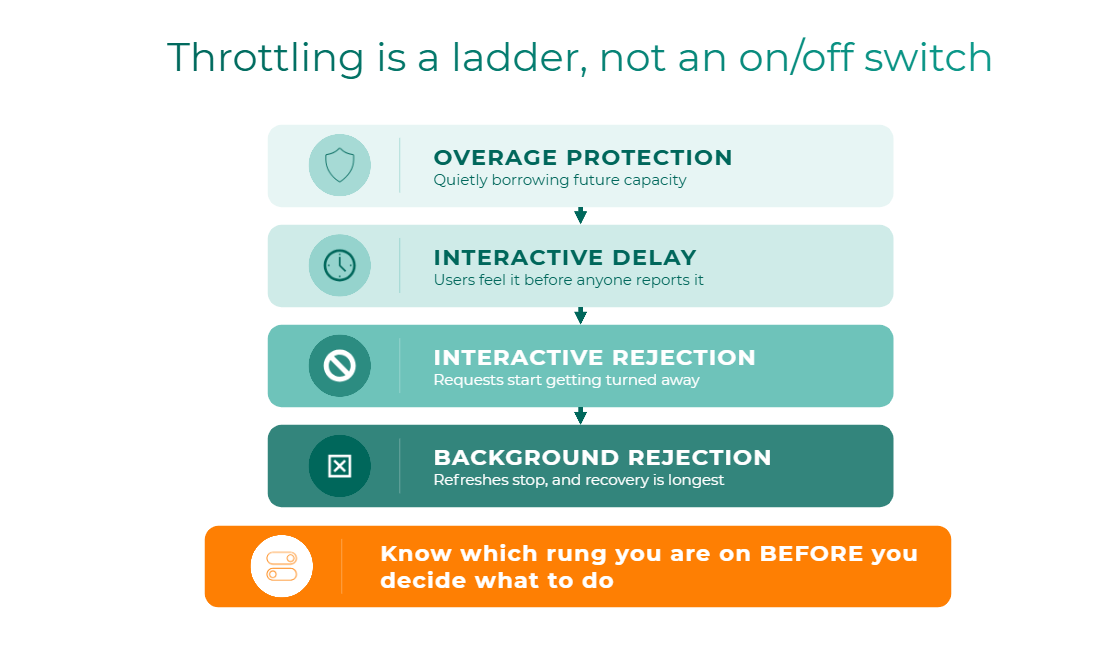
The practical point is that “throttling” isn’t one condition. It’s a ladder, and each rung calls for a different response. A capacity sitting in interactive delay after a busy morning is a very different situation from one where background refreshes are being rejected.
Know which rung you’re on before you decide what to do.
90 minutes or 36 hours
Here’s the number that changes how most teams think about throttling.
The rule of thumb is simple: however far you went over 100%, that percentage translates into extra time on top of the smoothing window.
Take the same overage, 250% of capacity, and apply it to each type of work:
- Interactive rejection at 250%: clears in roughly 90 minutes
- Background rejection at 250%: clears in roughly 36 hours
Same overage. Same capacity. One is a rough afternoon, and the other stretches into the day after tomorrow. The only difference is the smoothing window.
For those who want the math:
- Recovery time ≈ ((peak percentage − 100) ÷ 100) × smoothing window
- Interactive: ((250 − 100) ÷ 100) × ~60 minutes = ~90 minutes
- Background: ((250 − 100) ÷ 100) × 24 hours = 36 hours
This asymmetry is why “just wait it out” isn’t a strategy. If you don’t know whether interactive or background work triggered the overage, you can’t even estimate how long the pain will last, let alone decide whether it’s worth intervening.
Not sure which rung your capacity reaches most often? That’s one of the first things a Fabric Capacity Health Check baselines.
Why the standard view can mislead you
This is also why the numbers can look fine while users are struggling.
Smoothing means the utilization you see at any given moment isn’t the same thing as the throttling signal. An administrator can open the Fabric Capacity Metrics App, see a reasonable current number, and conclude the capacity is healthy, while the backlog from last night’s refresh is still being paid down and interactive users are being delayed.
It’s one of the most common points of confusion we hear from Fabric admins, and it’s not a sign that anyone is reading the tools wrong. It’s a sign that a single snapshot can’t tell you what happened. You have to look backward across a window long enough to catch the original spike. We’ll go deeper on what good monitoring looks like, and what questions it should answer, later in this series.
What this means for your three decisions
Smoothing and throttling aren’t just technical trivia. They change how you should approach each of the three decisions from Part 2.
- Size. Size for your real background windows and the smoothed load they create, not for an average or a single snapshot. A capacity that looks oversized at 2 p.m. may be exactly right once you account for what the overnight jobs leave behind.
- Share. Heavy background work sharing a pool with executive dashboards is the classic setup for the Tuesday-morning echo. If your most important interactive workloads keep feeling the aftermath of someone else’s refresh, that’s a strong argument for drawing an intentional boundary.
- Own. When a backlog hits, someone has to be able to answer a simple question: whose job caused this? Without workspace and workload ownership, and at least basic showback, the answer is usually a shrug, and the same spike happens again next week.
Three things to carry forward
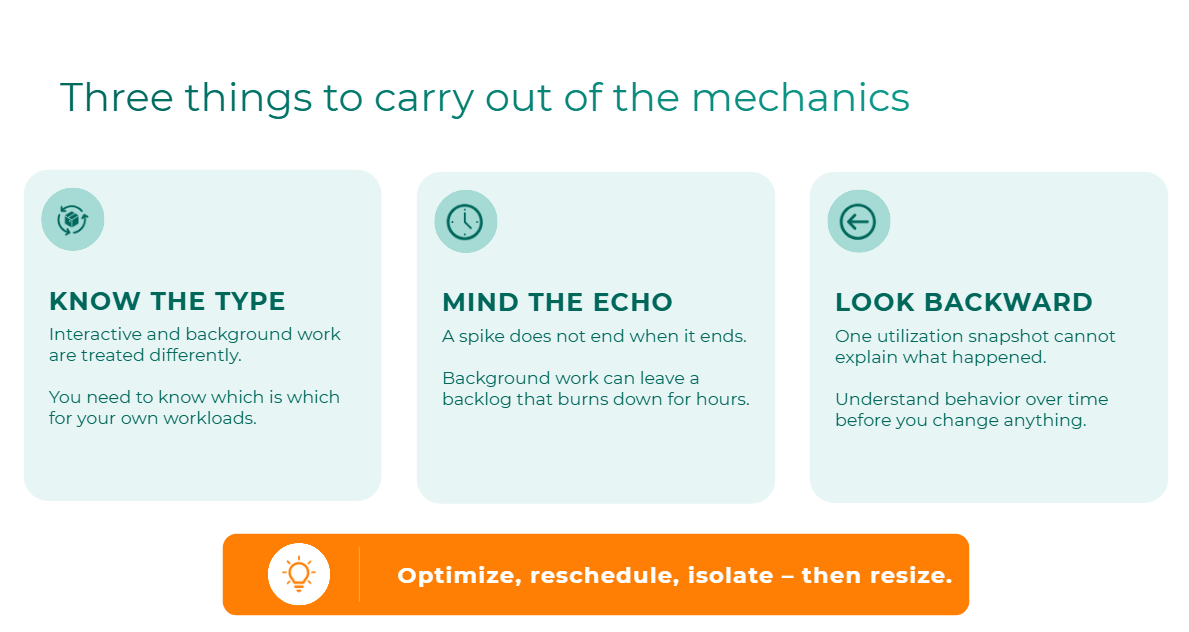
- Mind the echo. A spike doesn’t end when it ends. Background work can leave a backlog that burns down for hours.
- Know the type. Interactive and background work are handled differently. You need to know which is which for your own workloads, including the ones, like warehouse queries, that may not be classified the way you’d expect.
- Look backward. One utilization snapshot can’t explain what happened. Understand behavior over time before you change anything.
And when you do act, work in order: optimize the workload first, reschedule second, isolate third, and resize only once you’ve ruled out the others. Fabric also offers newer levers for specific situations, including surge protection, capacity overage, and Autoscale Billing for Spark. They’re precision tools rather than blanket fixes, and we’ll cover when each one fits in our playbook post.
Next in the series: If a snapshot can’t tell you what happened, what can? We’ll cover the six questions your Fabric monitoring should be able to answer, and where the Capacity Metrics App runs out.
Watch the full webinar: Control Microsoft Fabric Costs: A FinOps Playbook for Capacity and Throttling is available on demand now.