
Part 6 ended with a simple question: which one is you? The pilot that slowed down in production, the AI workload that changed the capacity profile, or the throttling incident that outlived the spike.
Recognizing your situation is real progress. But it isn’t the same as being ready for it.
Look back at those three scenarios and you’ll notice that none of them started with a lever. Each one started with a question.
- What changed right before things got worse?
- How critical is the existing reporting?
- What actually crossed the line, and was it interactive or background work?
The right fix followed from the answer every time. Those questions only help if your team can answer them with data. This post gives you five that test whether it can.
Why these five questions
If you’ve followed the series, you’ve already seen a couple of checklists.
- Part 2 offered three quick questions to gut-check your decisions.
- Part 4 listed six that a Fabric administrator should be able to answer.
These five serve a different purpose. They’re built for the capacity review, meaning the meeting where workload owners, platform leads, and whoever signs off on the bill are in the same room. They pull together everything the series has covered into the questions that matter at the leadership level.
The test is simple. If you can answer all five, you’re running Fabric on purpose. If you can’t, you’re running it by default.
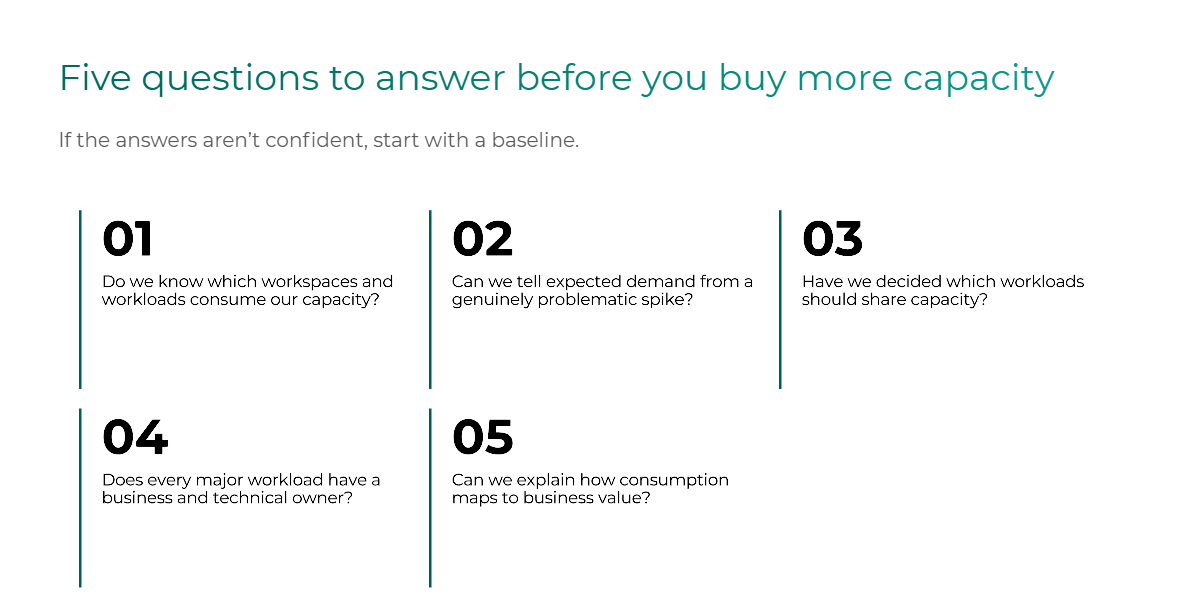
Question 1: Do we know which workspaces and workloads consume our Fabric capacity?
A confident answer names your top consumers by workspace and item, and says whether each one is recurring or a one-off.
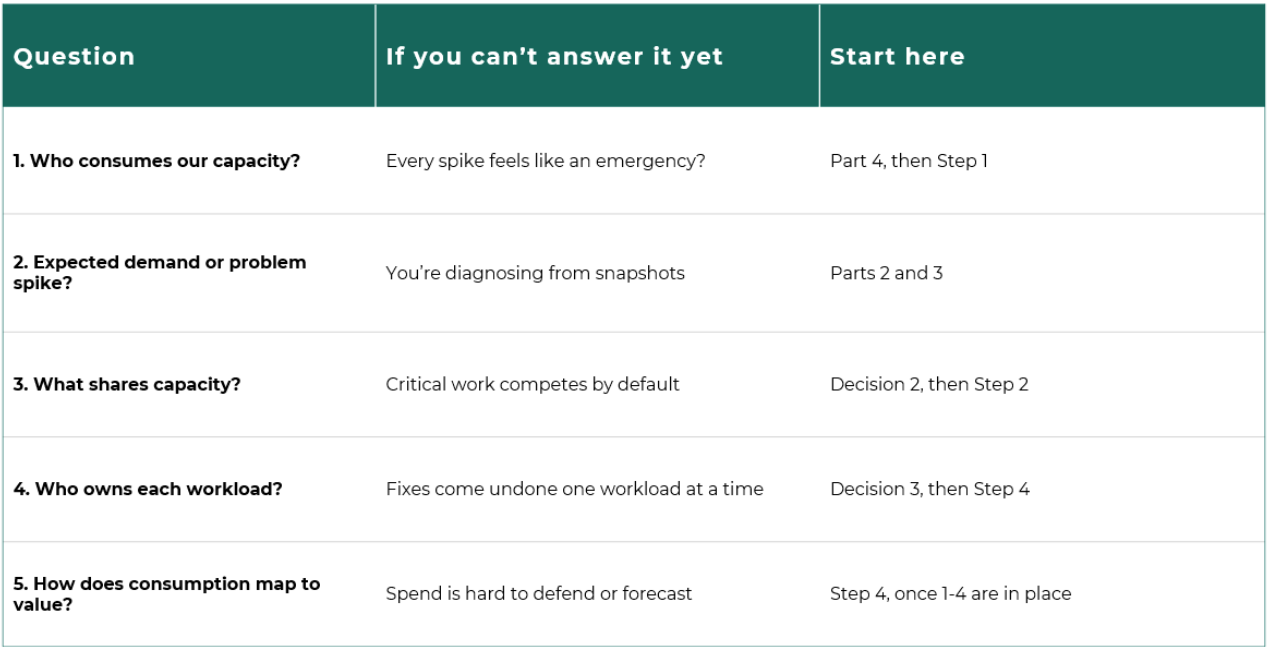
A shaky answer usually means every spike feels like an emergency, because nobody knows what normal looks like.
Go deeper: Part 4 (the six monitoring questions) and Step 1 of the playbook in Part 5.
Question 2: Can we distinguish expected demand from problematic spikes?
A confident answer separates the Monday refresh wave and month-end close, which you can plan for, from the unusual events that deserve an investigation.
A shaky answer usually means the team is diagnosing from a single utilization snapshot. Remember that “expected” also includes the backlog your own overnight jobs leave behind. A heavy background job is smoothed across the following 24 hours, so part of tomorrow morning’s load was scheduled last night.
Go deeper: The shape diagnostic in Part 2 and the smoothing mechanics in Part 3.
Question 3: Have we decided which workloads should share capacity?
A confident answer describes a small number of intentional boundaries and explains which workloads they protect and why.
A shaky answer usually sounds like “everything is on the same capacity because that’s where it landed.” That isn’t a decision. It’s a default.
Go deeper: Decision 2 in Part 2, Step 2 in Part 5, and the AI workload scenario in Part 6.
Question 4: Does every major workload have a business and a technical owner?
A confident answer puts two names next to each major workspace and workload. The business owner explains its value, and the technical owner explains its consumption.
A shaky answer means the next time someone asks “whose job caused this?”, the reply is a shrug, and the same spike comes back next week.
Go deeper: Decision 3 in Part 2 and Step 4 in Part 5.
Question 5: Can we explain how Fabric consumption maps to business value?
A confident answer connects what each major workload consumes to what it delivers, well enough to defend the spend to a CFO.
A shaky answer means Fabric cost is still an IT line item nobody outside IT can explain.
This is the question your CDO or CFO will eventually ask, especially as Copilot and Data Agent workloads come onto the platform. It’s also the one the other four make answerable. Without a baseline, clear demand patterns, intentional boundaries, and named owners, there’s no honest way to tie consumption to value.
Go deeper: Step 4 and the closing argument of Part 5: the goal is matching spend to value, not minimizing the bill.
Score yourself honestly
Go through the five and give each one of three answers: yes, with data; partly; or no, or only a best guess.
Don’t worry about an overall grade. The more useful signal is the first question you couldn’t answer with data. That’s usually where to start, because each question builds on the ones before it.
The first move probably isn’t more capacity
If you couldn’t answer all five with confidence, here’s the honest advice: the first move probably isn’t buying more capacity. It’s establishing a clear baseline.
That’s been true throughout this series. In all three scenarios from Part 6, “buy more capacity” was never the right first move. At best, it was the last resort. At worst, it was a monthly charge for a problem a schedule change could have solved.
Where a Fabric Capacity Health Check fits
A baseline is exactly what Lantern’s Fabric Capacity Health Check is built to establish. We work with your team to identify what’s actually driving your consumption, where performance or cost risk is emerging, and which actions to prioritize for your environment.
It isn’t a generic audit. It’s built around the same framework this series has walked through: sizing, organization, controls, and accountability. By the end, you should be able to answer these five questions with data rather than instinct.
Take the checklist into your next review
In Part 6, we promised a checklist you could bring into your next capacity review. Here it is.
The downloadable version includes all five questions plus a few things this post doesn’t: a scoring guide, a description of what a confident answer looks like for each question, and a suggested agenda for running the review with your workload owners.
Download the Five-Question Fabric Capacity Checklist →
The series in one page
If you’re arriving here first, this is the whole series in seven lines:
- Predictable, Not Predictable. Fabric’s price is fixed. What runs on it isn’t.
- The 3 Decisions. Your bill is shaped by how much capacity you buy, what shares it, and who owns consumption.
- Smoothing and throttling. A spike doesn’t end when it ends, and the same overage can cost you 90 minutes or 36 hours.
- Monitoring. The standard view tells you something is happening. A deeper view tells you what, and to whom.
- The Four-Step Playbook. Baseline, organize, control, and create accountability, in that order.
- Three scenarios. The playbook applied to the situations teams actually run into.
- Five questions. The test of whether you’re running Fabric on purpose or by default.
Fabric FinOps isn’t a one-time sizing exercise you do once and forget. It’s an operating discipline, and it has to evolve as new teams, new workloads, and new AI use cases keep landing on the platform.
What’s next: As more AI-driven workloads mature on Fabric, the conversation shifts from what they cost to how you give them the right context and structure to deliver real value. We’ll be digging into that in an upcoming session.
Watch the full webinar: Control Microsoft Fabric Costs: A FinOps Playbook for Capacity and Throttling is available on demand now.