
Back to Tuesday morning. In Part 3, we explained why reports are still crawling hours after Monday night’s refresh finished. The excess from that job was smoothed across the following 24 hours, and the backlog it left behind is still being paid down.
That explains why. It doesn’t answer the questions your team actually has to act on: Which job was it? Whose is it? And what should change so it doesn’t happen again next Monday?
We closed Part 3 with a simple piece of advice: look backward. This post is about what it takes to do that well, and why the view most teams start with only gets them part of the way there
What the Capacity Metrics App gets right
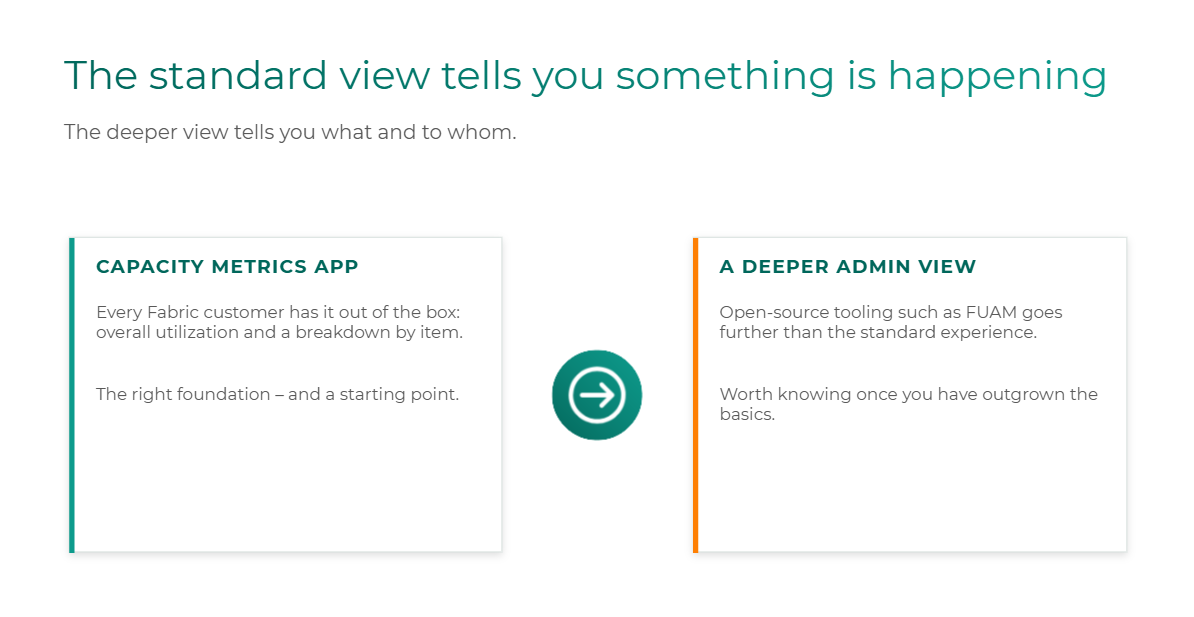
Every Fabric customer has access to the Microsoft Fabric Capacity Metrics App. It shows how much of your capacity is being used and breaks consumption down by item, and for most teams it’s the first place to look when something feels off.
It’s the right foundation. If your team isn’t checking it regularly, start there, and nothing in this post argues otherwise.
But it’s a starting point. And most teams discover its limits at exactly the moment they need answers most: in the middle of a throttling incident, with users complaining and leadership asking what happened.
Where the standard view runs out
The issue usually isn’t the app. It’s the question you’re asking it.
As we covered in Part 3, smoothing spreads excess consumption forward in time. That means peak utilization is not the same thing as the throttling signal. An administrator can open the app, see a reasonable number, and conclude the capacity is healthy, while interactive users are being delayed by a backlog from hours earlier.
It’s one of the most common points of confusion we hear from Fabric admins, and it’s not a sign that anyone is reading the tool wrong. A utilization number tells you how busy your capacity is. It doesn’t tell you why it’s busy, what’s causing the pressure your users feel right now, or whose workload is responsible.
Those are the questions that decide what you do next. So those are the questions your monitoring needs to answer.
Six questions your monitoring should be able to answer
Fabric capacity monitoring is the practice of tracking which workloads consume capacity, when, and why, so you can act on the cause of a problem rather than its symptom. In practice, that comes down to six questions. Here’s the list we’d want any Fabric administrator to be able to answer with confidence:
- Which workspaces and items consume the most capacity? This is your baseline. Without it, you can’t tell what “normal” looks like, and every spike feels like an emergency. It’s the starting point for Decision 1 from Part 2: how much capacity you actually need.
- Is that consumption recurring, or was it a one-time spike? A pattern that shows up every Monday or every month-end is a planning problem. A one-off is an incident. This is the “shape of utilization” diagnostic from Part 2, applied workload by workload.
- Which workloads are interactive, and which are background? This tells you which smoothing window applies, and therefore how long recovery will take. It’s the difference between the 90-minute problem and the 36-hour problem from Part 3.
- Are business-critical workloads competing with lower-priority activity? If your executive dashboards keep feeling the aftermath of an experimental workload, that’s a strong signal you need an intentional boundary. This is Decision 2: what should share capacity.
- What’s the root cause: workload design, scheduling, capacity, or isolation? This is the question that matters most, because each answer leads to a different fix. More on that in the next section.
- Which team or business unit should own the resulting cost? This is where monitoring stops being a technical exercise and becomes an accountability one. It’s Decision 3: who owns consumption.
Notice that the six questions map directly onto the three decisions. That’s not an accident. Monitoring is how you make those decisions with evidence instead of instinct.
The root cause decides the fix
Question 5 deserves a closer look, because it’s where teams most often jump to the wrong answer. The fix is completely different depending on what’s actually going on:
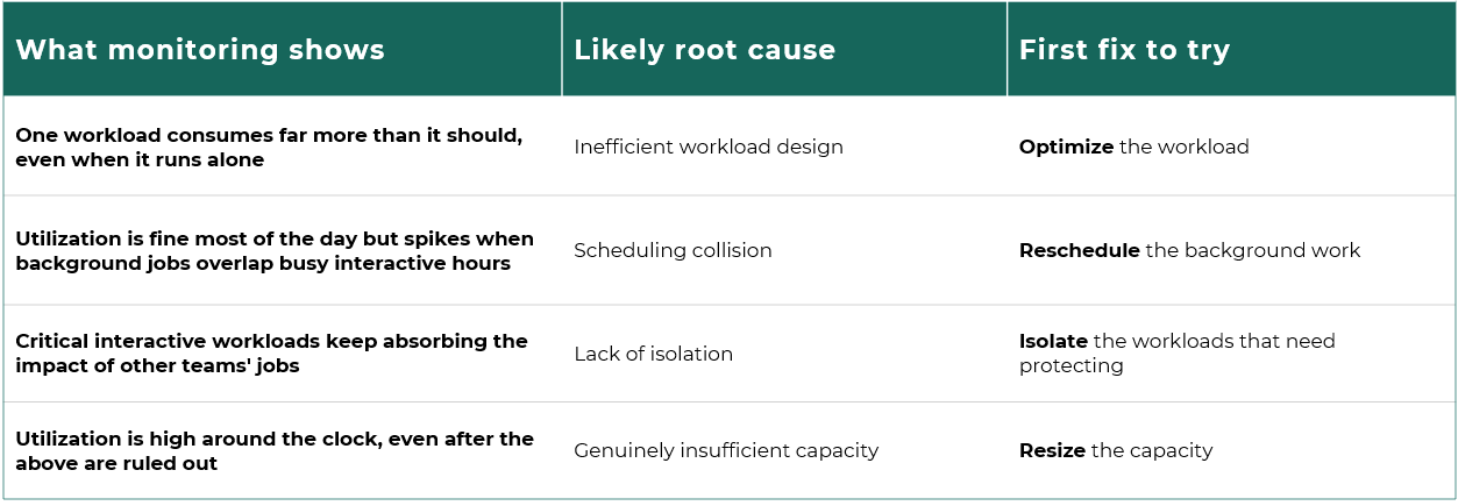
This is the same order we’ve recommended throughout the series: optimize first, reschedule second, isolate third, and resize only once you’ve ruled out the others. Good monitoring is how you know which of those steps you’ve actually earned.
Without it, resizing becomes the default answer to every problem. It’s the easiest lever to pull and the one that shows up on your bill every month afterward.
When you’ve outgrown the standard view
For many teams, the Capacity Metrics App is enough for a while. But as more teams, workspaces, and capacities come onto the platform, answering all six questions from the standard experience gets harder.
That’s the point where mature environments start looking further. One option worth knowing about is FUAM (Fabric Unified Admin Monitoring), an open-source monitoring solution built by people on the Microsoft side. It provides a more detailed administrative view of your Fabric environment than the out-of-the-box experience.
A few things to keep in mind if you evaluate it:
- It’s a community project, not an official Microsoft product. Treat it like any open-source tool: decide who on your team will own, maintain, and update it.
- It complements the Capacity Metrics App rather than replacing it. The app stays your foundation.
- More tooling isn’t the goal. A deeper view is only worth it if it helps you answer the six questions faster and more confidently.
You’ll likely know you’ve outgrown the standard view when you keep finding yourself unable to answer questions 4 through 6 without a lot of manual digging.
The standard view tells you something is happening. The deeper view tells you what, and to whom. You need both, but many organizations stop at the first and then wonder why they can’t diagnose anything.
Monitoring is the bridge to accountability
It’s worth coming back to question 6, because it’s the one that turns monitoring into something the business cares about.
Dashboards for their own sake don’t change behavior. What changes behavior is a team being able to see the consumption it creates. That’s the showback model we described in Part 2, and it depends entirely on monitoring that can attribute consumption to a workspace, a workload, and ultimately an owner.
Without that attribution, the answer to “whose job caused the Tuesday-morning slowdown?” is usually a shrug, and the same spike happens again next week. With it, the conversation shifts from “Fabric is slow” to “our refresh schedule is colliding with finance’s reporting window, and here’s what we’re changing.”
That shift, from a vague platform complaint to a specific, owned action, is what good Fabric monitoring is really for.
A quick self-check
Go back through the six questions and ask how many your team could answer today, with data rather than a best guess:
- Five or six: You have strong visibility. The next step is turning it into a regular operating rhythm rather than an incident-response tool.
- Three or four: You can see that something is happening, but likely not why or whose. That gap is where most misdiagnosed throttling incidents come from.
- Two or fewer: You’re probably making capacity decisions by instinct. That’s the most common pattern we see as Fabric moves from pilot to production, and it’s very fixable.
Baselining these six questions is the first thing a Fabric Capacity Health Check does. If your team landed in the bottom two groups, it’s a practical place to start.
Next in the series: Visibility is only useful if you act on it. We’ll walk through the four-step Fabric FinOps playbook, from baseline to accountability, including when newer levers like surge protection, capacity overage, and Autoscale Billing for Spark are the right fit.
Watch the full webinar: Control Microsoft Fabric Costs: A FinOps Playbook for Capacity and Throttling is available on demand now.

Not sure where your capacity stands?
Lantern’s Fabric Capacity Health Check identifies what’s driving your consumption, where performance or cost risk is emerging, and which actions to prioritize first.